Build a "what's near me" feature
Almost every location app ships some version of "what's near me": open the app, see the cafés, bars and shops around you, nearest first. With the Overture Maps API that's one request per screen. No GeoParquet downloads, no spatial database, no tile pipeline.
This guide builds that feed around Bondi Beach in Sydney. Sydney is one of the demo key's cities, so every request below works as written with DEMO-API-KEY. Swap in your own coordinates and your own key when you're ready to go anywhere else.
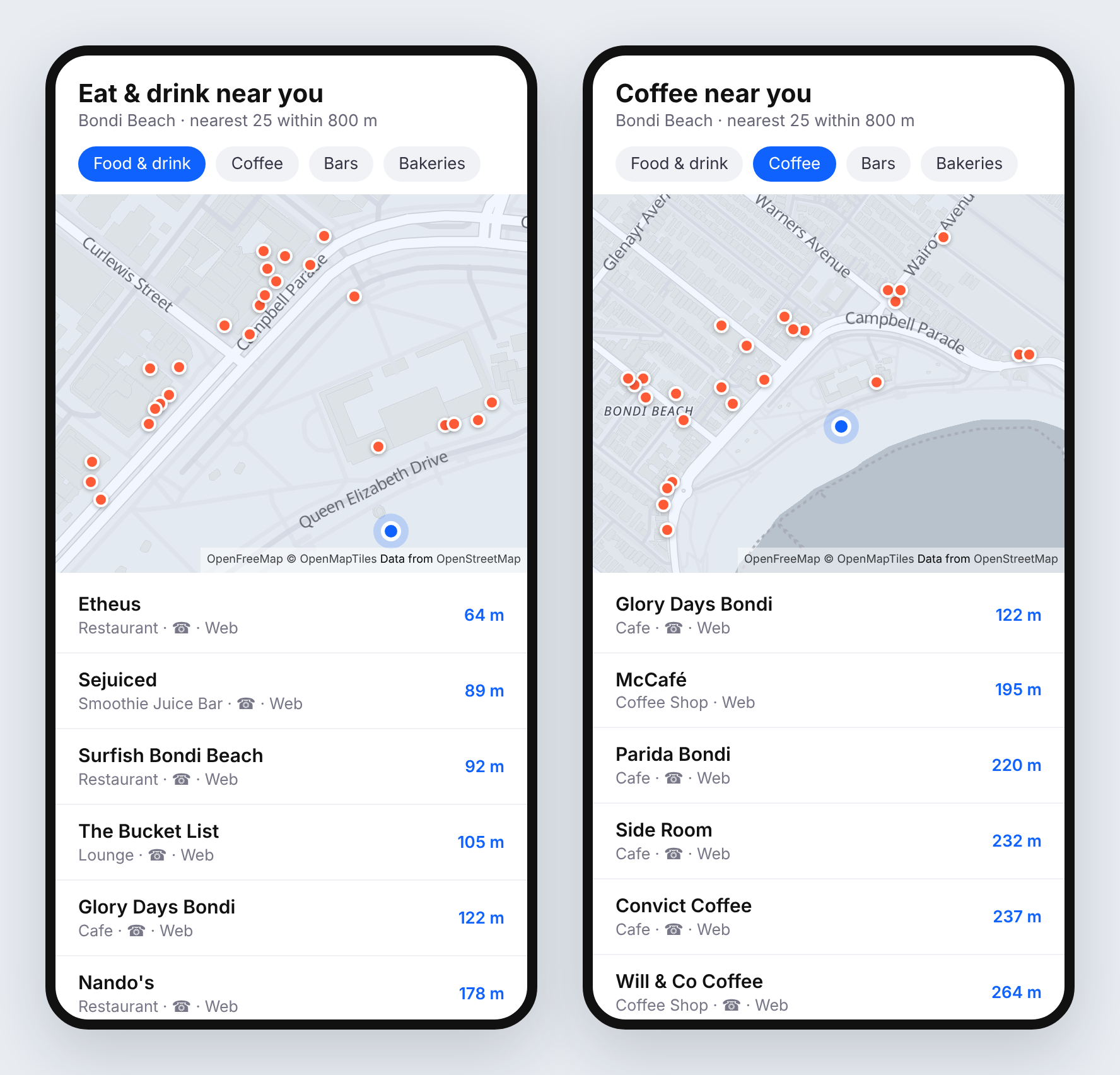
/places responses within 800 m of Bondi Beach. Map: OpenFreeMap, © OpenMapTiles, data © OpenStreetMap contributors.
What you'll build
A list of places around the user that:
- comes back nearest first, with a walking distance on each row
- switches between broad and specific categories with a row of chips ("Food & drink", "Coffee", "Bars", "Bakeries")
- hides places known to be closed
- only shows places someone can actually contact or look up
Step 1: Make one nearby request
Pass the user's position as lat and lng, a radius in metres, and a category filter. taxonomy=food_and_drink is the broad one: it matches every restaurant, café, bar and bakery in one go.
curl -H "x-api-key: DEMO-API-KEY" -X GET -G 'https://api.overturemapsapi.com/places' \
-d 'lat=-33.8910' -d 'lng=151.2769' -d 'radius=800' -d 'taxonomy=food_and_drink' -d 'limit=25'
Each result carries the place's name, coordinates, category, address and contact details:
{
  "geometry": { "type": "Point", "coordinates": [151.2698344, -33.8891709] },
  "properties": {
    "names": { "primary": "Grill'd Burgers - Bondi Beach" },
    "basic_category": "restaurant",
    "taxonomy": {
      "primary": "burger_restaurant",
      "hierarchy": ["food_and_drink", "restaurant", "meat_restaurant", "burger_restaurant"]
    },
    "operating_status": "open",
    "confidence": 0.975,
    "websites": ["https://grilld.com.au/restaurants/new-south-wales/bondi-beach"],
    "phones": ["+61 2 9179 8703"],
    "addresses": [{ "freeform": "89-93 Hall Street", "locality": "Bondi Beach", "postcode": "2026", "country": "AU" }]
  }
}
Results come back nearest first, so the top of the list is the closest place. radius defaults to 1,000 m and goes up to 25,000 m on your own key. The demo key caps the radius at 2,000 m and returns smaller pages.
Step 2: Get the user's location
In the browser, navigator.geolocation gives you the coordinates. Round them to three decimal places (roughly 100 m) before you query:
function getPosition(): Promise<{ lat: number; lng: number }> {
  return new Promise((resolve, reject) =>
    navigator.geolocation.getCurrentPosition(
      ({ coords }) =>
        resolve({
          lat: Math.round(coords.latitude * 1000) / 1000,
          lng: Math.round(coords.longitude * 1000) / 1000,
        }),
      reject,
      { enableHighAccuracy: false, timeout: 10_000 },
    ),
  );
}
Rounding does two jobs. Responses are cached by their exact parameters, so a user wandering down the same street keeps hitting the cache instead of making a fresh query every few metres. And you never send anyone's precise position to a third party when 100 m is plenty for "what's near me".
Step 3: Fetch, then add distances
The API sorts by distance but doesn't return the distance itself, so work it out on the client with the haversine formula. It's a few lines and needs no library:
type Place = {
  name: string;
  category: string;
  lat: number;
  lng: number;
  distanceM: number;
  phone?: string;
  website?: string;
  status: string | null;
};

const API = "https://api.overturemapsapi.com/places";

function distanceM(aLat: number, aLng: number, bLat: number, bLng: number): number {
  const R = 6_371_000;
  const toRad = (d: number) => (d * Math.PI) / 180;
  const dLat = toRad(bLat - aLat);
  const dLng = toRad(bLng - aLng);
  const h =
    Math.sin(dLat / 2) ** 2 +
    Math.cos(toRad(aLat)) * Math.cos(toRad(bLat)) * Math.sin(dLng / 2) ** 2;
  return Math.round(2 * R * Math.asin(Math.sqrt(h)));
}

export async function nearby(
  lat: number,
  lng: number,
  filter: Record<string, string>,
  radius = 800,
): Promise<Place[]> {
  const params = new URLSearchParams({
    lat: String(lat),
    lng: String(lng),
    radius: String(radius),
    limit: "25",
    has_contact: "phone,website", // Step 6
    ...filter,
  });
  const res = await fetch(`${API}?${params}`, {
    headers: { "x-api-key": "YOUR-API-KEY" },
  });
  if (!res.ok) throw new Error(`Places request failed: ${res.status}`);

  const features: any[] = await res.json();
  return features
    .map(({ geometry, properties: p }) => {
      const [pLng, pLat] = geometry.coordinates;
      return {
        name: p.names.primary,
        category: (p.basic_category ?? "").replaceAll("_", " "),
        lat: pLat,
        lng: pLng,
        distanceM: distanceM(lat, lng, pLat, pLng),
        phone: p.phones?.[0],
        website: p.websites?.[0],
        status: p.operating_status,
      };
    })
    .filter((place) => !CLOSED.has(place.status ?? "")) // Step 5
    .sort((a, b) => a.distanceM - b.distanceM);
}

const CLOSED = new Set(["permanently_closed", "temporarily_closed"]);
Around Bondi, the first rows are Etheus at 64 m, Sejuiced at 89 m and Surfish at 92 m.
A key shipped in a mobile app or a public web page can be copied. Either call the API from your own backend, or lock the key to your domains. See Securing API keys with domain locking.
Step 4: Add category chips
Each chip is just a different filter. taxonomy is hierarchy-aware: it matches a place's primary category or any ancestor, so one broad value covers everything beneath it. categories matches specific values, and takes a comma-separated list.
| Chip | Filter | Around Bondi (800 m) |
|---|---|---|
| Food & drink | taxonomy=food_and_drink | a full page of 25 |
| Coffee | categories=coffee_shop,cafe | a full page of 25 |
| Bars | taxonomy=bar | 17 |
| Bakeries | taxonomy=bakery | 5 |
const CHIPS: Record<string, Record<string, string>> = {
  "Food & drink": { taxonomy: "food_and_drink" },
  Coffee: { categories: "coffee_shop,cafe" },
  Bars: { taxonomy: "bar" },
  Bakeries: { taxonomy: "bakery" },
};

const places = await nearby(lat, lng, CHIPS["Coffee"]);
categories=coffee_shop,cafe is the useful pairing for "Coffee": Overture files some coffee places as cafe and some as coffee_shop, and people looking for a flat white don't care which. Browse the full vocabulary with /places/categories, which accepts the same lat/lng/radius so you can build chips from what actually exists near the user.
Step 5: Hide closed places
There's an operating_status filter, but for this feature filter on the client instead. Most places carry no status signal at all (operating_status: null), and operating_status=open drops every one of them. Within 800 m of Bondi, taxonomy=food_and_drink&operating_status=open returns a single place, while the same search without it fills the page.
So treat "unknown" as open and remove only the places known to be closed. That's the CLOSED set in Step 3.
Step 6: Only show places people can reach
A list entry is only useful if the user can ring it, book it or look it up. has_contact=phone,website keeps places with either a phone number or a website (the values are OR'd), which removes most of the long tail of unnamed or stale entries. It's already in the nearby() call above. Drop it if you'd rather show everything.
For tighter results, add min_confidence (0 to 1). It trades recall for precision on low-confidence records.
Step 7: When nothing comes back
In quiet areas a small radius can return an empty list. Widen it in steps rather than starting large, so city users still get the nearest places first:
export async function nearbyWithFallback(lat: number, lng: number, filter: Record<string, string>) {
  for (const radius of [500, 1_500, 5_000]) {
    const places = await nearby(lat, lng, filter, radius);
    if (places.length > 0) return { radius, places };
  }
  return { radius: 5_000, places: [] };
}
Show the radius you ended up using ("within 1.5 km"), so the distances make sense.
Going further
- Search as you type. Add
name_prefixfor a suggestions box. Withlat/lngit also returns nearest first. See By Partial Name. - Brand logos. Add
enrichment_fields=brandto get logos and official websites for chains. See Build a local business directory. - Put it on a map. Add
format=geojsonand hand the response straight to MapLibre, Leaflet or Mapbox. Map every location of a retail chain shows the Leaflet version. - More results. Page through with
limitandpage. See Pagination.
That's the whole feature: one radius request per chip, distances on the client, closed places filtered out, and a widening radius for quiet areas.