GET ./buildings
Returns Overture Maps building footprints around a point: the polygon for each building, plus whatever Overture knows about it, such as height, number of floors, class, roof shape and facade material. It's the buildings theme of Overture on its own. If you want places matched to the building they sit in, use /places/buildings instead.
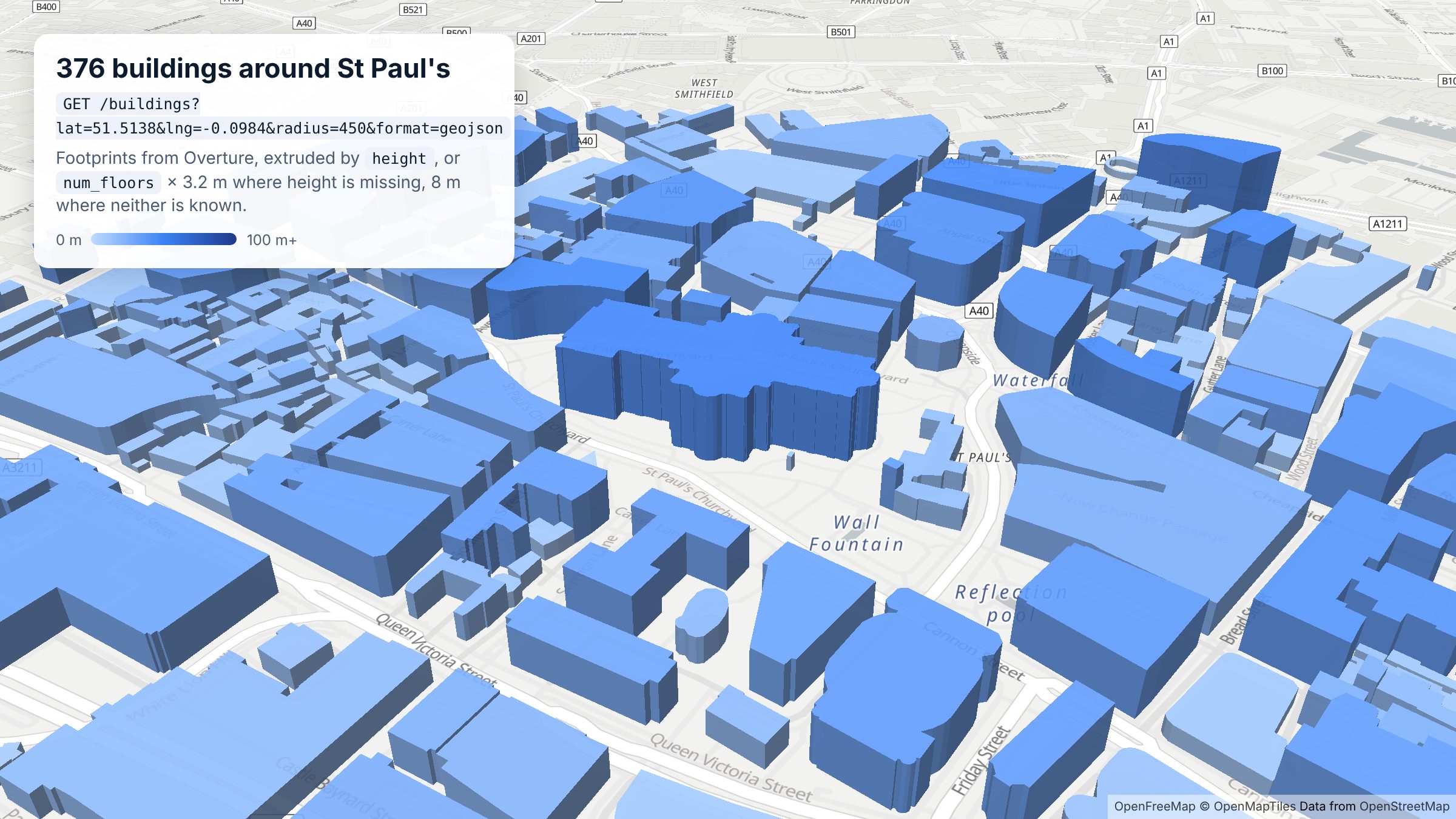
/buildings request with format=geojson. Map: OpenFreeMap, © OpenMapTiles, data © OpenStreetMap contributors.
Query parameters
| Parameter | Description |
|---|---|
lat, lng | Centre of the search. Required. |
radius | Search radius in metres. Default 1000, maximum 25000. |
limit | Results per page. Default 100, maximum 25000. |
page | Page number, 0-indexed. See Pagination. |
format | json (default) or geojson. |
includes | Comma-separated list of property names to return, to keep responses small. Properties with no value are left out. |
The full parameter list is in the OpenAPI reference.
Example
Buildings within 200 m of St Paul's Cathedral in London, first three results:
curl -i -H "x-api-key: DEMO-API-KEY" -X GET -G 'https://api.overturemapsapi.com/buildings' \
-d 'lat=51.5138' -d 'lng=-0.0984' -d 'radius=200' -d 'limit=3'
Pagination-Count: 43
Pagination-Page: 0
Pagination-Limit: 3
Pagination-Count is the total for the search: 43 buildings within 200 m. Each result is a building with a Polygon (or MultiPolygon) geometry:
{
  "id": "551debe5-6bb3-4c63-809d-c861141916dd",
  "geometry": { "type": "Polygon", "coordinates": [[[-0.0990366, 51.5134959], "..."]] },
  "properties": {
    "names": { "primary": "St Paul's Cathedral" },
    "subtype": "religious",
    "class": "cathedral",
    "height": 35,
    "has_parts": true,
    "is_underground": false,
    "num_floors": null,
    "roof_shape": null,
    "facade_material": null,
    "sources": [{ "dataset": "OpenStreetMap", "license": "ODbL-1.0" }],
    "theme": "buildings",
    "type": "building"
  }
}
The id is the building's GERS ID, the same stable identifier Overture uses everywhere, so you can join it to other Overture data.
What's in the properties
How much each building carries depends on its sources. In the St Paul's example, the cathedral has a height but no num_floors, while St Paul's Chapterhouse next door has num_floors: 3, a height of about 26.6 m, facade_material: "brick" and roof_shape: "mansard". Many smaller buildings have only a footprint. Within 450 m of St Paul's, 68 of 376 buildings have a height and 217 have num_floors.
| Property | What it is |
|---|---|
names.primary | The building's name, where it has one |
subtype, class | What the building is for, from broad (religious) to specific (cathedral) |
height, min_height | Height in metres, and where the building starts above ground |
num_floors, num_floors_underground, min_floor | Floor counts |
roof_shape, roof_material, roof_color, roof_height, roof_direction, roof_orientation | Roof details |
facade_material, facade_color | Facade details |
has_parts | true when Overture also models separate building parts, such as a tower or dome |
is_underground | true for underground structures |
sources | Which dataset each value came from, with its licence |
If you only need a few of these, use includes, so the response only carries those properties:
curl -H "x-api-key: DEMO-API-KEY" -X GET -G 'https://api.overturemapsapi.com/buildings' \
-d 'lat=51.5138' -d 'lng=-0.0984' -d 'radius=200' -d 'includes=height,num_floors,class'
Draw buildings in 3D
Ask for format=geojson and the response is a FeatureCollection you can hand straight to MapLibre, Mapbox or deck.gl. This is how the image at the top of this page was made:
import maplibregl from "maplibre-gl";

const params = new URLSearchParams({
  lat: "51.5138",
  lng: "-0.0984",
  radius: "450",
  limit: "2000",
  format: "geojson",
});
const res = await fetch(`https://api.overturemapsapi.com/buildings?${params}`, {
  headers: { "x-api-key": "YOUR-API-KEY" },
});
const buildings: GeoJSON.FeatureCollection = await res.json();

map.addSource("buildings", { type: "geojson", data: buildings });
map.addLayer({
  id: "buildings-3d",
  type: "fill-extrusion",
  source: "buildings",
  paint: {
    // height if known, otherwise floors x 3.2 m, otherwise 8 m
    "fill-extrusion-height": [
      "coalesce",
      ["get", "height"],
      ["*", ["get", "num_floors"], 3.2],
      8,
    ],
    "fill-extrusion-color": [
      "interpolate", ["linear"],
      ["coalesce", ["get", "height"], 8],
      0, "#BFDBFE", 30, "#3B82F6", 100, "#1E3A8A",
    ],
    "fill-extrusion-opacity": 0.9,
  },
});
Try it without writing any code in the Buildings demo.
Tips
- Keep the radius tight. Building polygons are much larger than place points. A few hundred metres in a city centre already returns hundreds of buildings, so start small and page with
limitandpagerather than using a large radius. - Check
Pagination-Countfirst. Ask forlimit=1to see how many buildings an area holds before pulling them all. - Expect gaps in heights and floors. Use a fallback, as in the example above, rather than assuming every building has a height.
- The demo key works within 10 km of New York, London, Paris and Bondi Beach. Sign up for a free key to search anywhere.
Related
/places/buildings: places, each matched to its nearest building shape/places: points of interest, with categories, brands and contact details- Overture's buildings documentation: the upstream schema and sources