Choose a min_confidence for Overture places
Every Overture place carries a confidence score between 0 and 1, and /places lets you filter on it with min_confidence. The hard part is choosing the number. Too low and your map fills with company registrations and stale records. Too high and real restaurants disappear.
This guide measures what each threshold does around Covent Garden in London, with real counts from the API, so you can choose with numbers instead of guesswork. London is one of the demo key's cities, so every request below works as written with DEMO-API-KEY. No GeoParquet download or DuckDB needed.
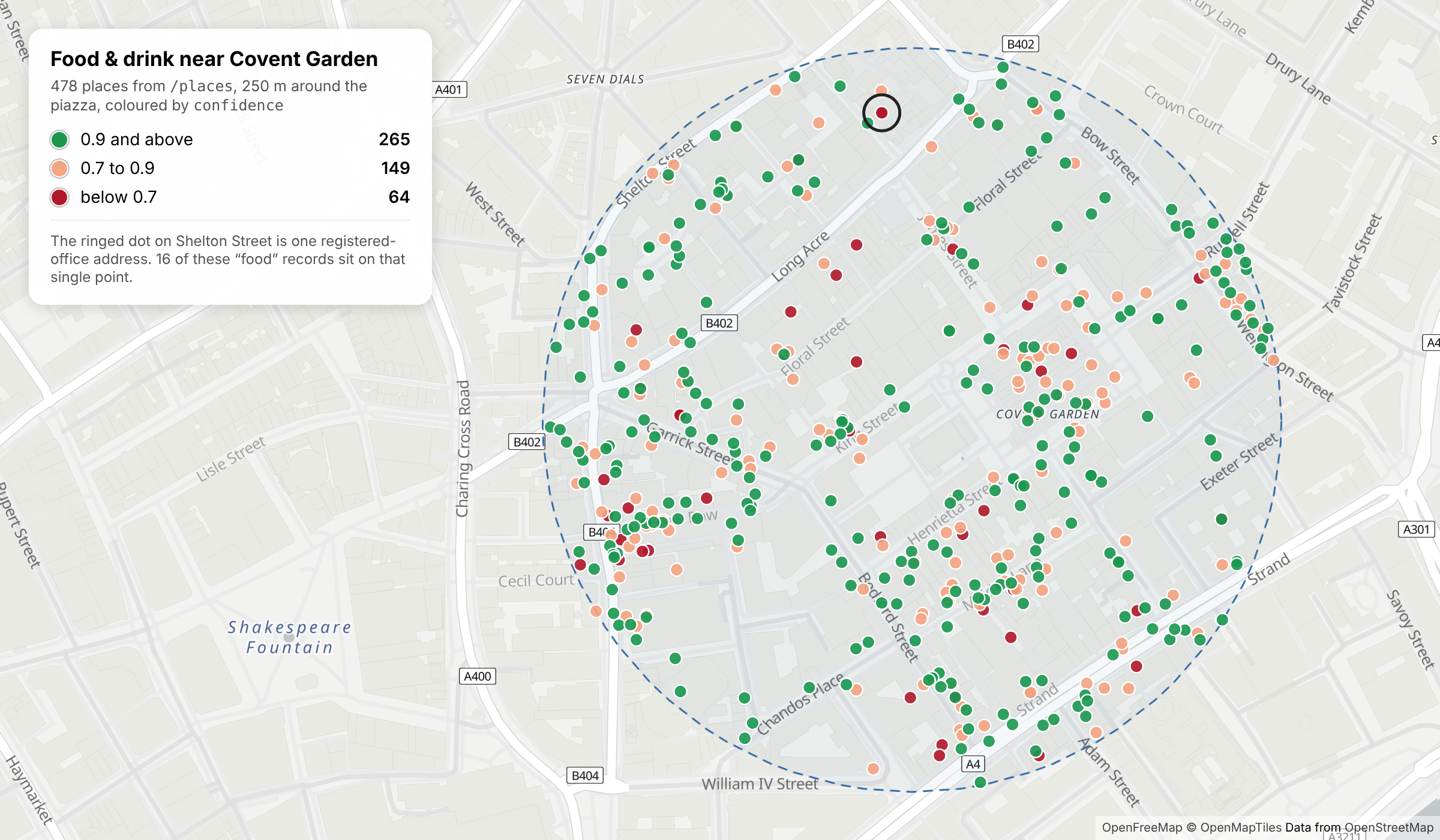
/places responses within 250 m of Covent Garden piazza, coloured by confidence. Map: OpenFreeMap, © OpenMapTiles, data © OpenStreetMap contributors.
What you'll build
- a quick way to count results at several thresholds before fetching anything
- a clear picture of what low-confidence records look like, and which real places sit among them
- a small client-side check that removes "stacked" records that share one point
- a threshold choice that fits your feature
Step 1: Count before you fetch
You don't need to download results to see what a filter does. Ask for limit=1 and read the Pagination-Count header, which holds the total number of matches across all pages:
curl -s -D - -o /dev/null -H "x-api-key: DEMO-API-KEY" -G 'https://api.overturemapsapi.com/places' \
-d 'lat=51.5117' -d 'lng=-0.1240' -d 'radius=250' -d 'limit=1' | grep -i pagination-count
pagination-count: 7637
That's 7,637 places within 250 m of the piazza with no filter at all. It looks high for a few streets, and Step 3 explains why. Each count is a normal request and counts towards your monthly allowance, but at one result per request it costs very little.
Step 2: Compare thresholds
Run the same count with different min_confidence values, once for every place and once for taxonomy=food_and_drink:
min_confidence | All places (250 m) | Food and drink (250 m) |
|---|---|---|
0 | 8,062 | 534 |
not set (default 0.5) | 7,637 | 478 |
0.6 | 2,446 | 429 |
0.7 | 1,891 | 414 |
0.8 | 1,382 | 316 |
0.9 | 1,015 | 265 |
0.95 | 681 | 242 |
Three things stand out.
The default is already 0.5. Leaving min_confidence out gives the same 7,637 as min_confidence=0.5. To see the records below 0.5, pass min_confidence=0 explicitly: that adds 425 places here.
Most of the drop happens just above 0.5. min_confidence=0.51 returns 2,930, so 4,707 of the 7,637 places have a confidence from 0.5 up to 0.51. Within the food and drink results, 43 places score exactly 0.5.
Categories behave very differently. Raising the threshold to 0.7 keeps 25% of all places but 87% of food and drink. Here, most of the low scores belong to company registrations rather than venues (Step 3). Check the category you actually care about before choosing a number.
Step 3: See what low confidence means here
Run a 5 m radius around one point on Shelton Street, a registered-office address that many companies use as their official address:
curl -s -D - -o /dev/null -H "x-api-key: DEMO-API-KEY" -G 'https://api.overturemapsapi.com/places' \
-d 'lat=51.5135678' -d 'lng=-0.1242954' -d 'radius=5' -d 'limit=1' | grep -i pagination-count
pagination-count: 5250
5,250 places share that single point. They are company registrations, most often filed as corporate_or_business_office or professional_service, and a few as bars and coffee shops. In a sample of 275 of them, every one came from a single source, BrightQuery. That one point accounts for 5,250 of the 7,637 places in Step 1. Raising the threshold thins it out but doesn't clear it:
| Filter at the Shelton Street point (5 m) | Places |
|---|---|
| none | 5,250 |
min_confidence=0.7 | 315 |
min_confidence=0.9 | 191 |
has_contact=phone,website | 4,689 |
has_contact doesn't help with this. Company records usually carry a phone number or website, so 4,689 of the 5,250 pass has_contact=phone,website. Across the whole 250 m radius, 6,888 of the 7,637 places do. Use has_contact when you need people to be able to reach a place, as in Build a "what's near me" feature, but don't rely on it to remove junk.
Step 4: Know what you lose
Low confidence doesn't mean fake. Among the 64 food and drink places below 0.7 are well-known restaurants and bars on Henrietta Street and Floral Street, such as Frenchie Covent Garden, The Petersham and Mrs Riot, all scored at 0.5. Raise the threshold to 0.7 and they disappear from your results.
The sources array on each place shows why. Of the 64 places below 0.7, 48 come from a single source, BrightQuery. Of the 265 at 0.9 and above, 179 include Meta as a source, 61 of them together with BrightQuery. Here's one, shortened:
"sources": [
  { "property": "", "dataset": "meta", "confidence": 0.9697698354721069 },
  { "property": "/properties/operating_status", "dataset": "BrightQuery", "confidence": null },
  { "property": "/properties/confidence", "dataset": "Overture", "confidence": null }
]
That's the record for % Arabica on King Street, which scores 0.999. In practice, a place reported by only one source scores lower even when it is real.
Step 5: Compare thresholds and remove stacks in code
Two small helpers cover most cases. compareThresholds runs the counts from Step 2 for any search. dropStacks removes every point that holds more records than a sensible limit, which no min_confidence value can do:
const API = "https://api.overturemapsapi.com/places";
const KEY = "DEMO-API-KEY"; // use your own key outside the demo cities

async function countPlaces(filters: Record<string, string>): Promise<number> {
  const params = new URLSearchParams({ ...filters, limit: "1" });
  const res = await fetch(`${API}?${params}`, { headers: { "x-api-key": KEY } });
  if (!res.ok) throw new Error(`Count failed: ${res.status} ${await res.text()}`);
  return Number(res.headers.get("Pagination-Count") ?? 0);
}

export async function compareThresholds(
  filters: Record<string, string>,
  thresholds = [0, 0.5, 0.7, 0.9],
): Promise<Record<string, number>> {
  const counts: Record<string, number> = {};
  for (const t of thresholds) {
    counts[t] = await countPlaces({ ...filters, min_confidence: String(t) });
  }
  return counts;
}

type Feature = {
  geometry: { coordinates: [number, number] };
  properties: { names: { primary: string }; confidence: number; [key: string]: unknown };
};

export function dropStacks(features: Feature[], maxPerPoint = 25): Feature[] {
  const key = (f: Feature) => f.geometry.coordinates.map((c) => c.toFixed(6)).join(",");
  const perPoint = new Map<string, number>();
  for (const f of features) perPoint.set(key(f), (perPoint.get(key(f)) ?? 0) + 1);
  return features.filter((f) => (perPoint.get(key(f)) ?? 0) <= maxPerPoint);
}

const coventGarden = { lat: "51.5117", lng: "-0.1240", radius: "250" };
console.log(await compareThresholds(coventGarden));
// { '0': 8062, '0.5': 7637, '0.7': 1891, '0.9': 1015 }
console.log(await compareThresholds({ ...coventGarden, taxonomy: "food_and_drink" }));
// { '0': 534, '0.5': 478, '0.7': 414, '0.9': 265 }
To test dropStacks, we fetched all 1,015 places at min_confidence=0.9 (41 pages of 25 with the demo key, see Pagination). One point holds 191 of them, the Shelton Street address, and the next busiest point holds 9. dropStacks(features) returns 824: everything except that stack. A limit of 25 records per point clears it and leaves busy real buildings alone. Adjust it if you work somewhere with large shopping centres or office towers.
Step 6: Pick a threshold for your feature
There's no single right number, but the counts above suggest a starting point:
| You're building | Start with | Why |
|---|---|---|
| A consumer map or "near me" list | taxonomy filter, default threshold, plus dropStacks | Keeps the single-source restaurants people actually visit. Stacks are the main source of noise. |
| A "verified only" view | min_confidence=0.9 plus dropStacks | Fewer, well-confirmed places. Expect real ones to go missing. |
| Lead lists or business counts | min_confidence=0.7, then has_contact | Removes most company registrations, then keeps businesses you can reach. |
| Coverage or data-quality analysis | min_confidence=0 | Shows everything, including records below the default 0.5. |
Whichever you choose, run compareThresholds on a sample of your own areas first. The share removed varies a lot between categories, and probably between cities too.
Going further
- Choose the category filter first.
taxonomy,categoriesandbasic_categorychange your counts far more than confidence does. See Filter Overture places by category. - Hide closed places.
operating_statusis a separate signal from confidence. See Build a "what's near me" feature. - Export what's left. Once your filters are settled, save the results as GeoJSON or CSV with Export Overture places to GeoJSON and CSV.
- Build a directory. Build a local business directory combines
min_confidencewith contact details and brand data. - Every filter. The full parameter list is on the Places endpoint page.